Implementation guideCRM APIs & sync
How to Build a CRM API Integration That Survives Production
Calling a CRM API takes an afternoon. Keeping a sync correct for years means designing for expired tokens, shifting pages, duplicate webhooks, rate limits and partial failures from the first commit. This guide walks through each of those decisions in the order you meet them.
You leave withA working design for a CRM connector: auth, incremental reads, safe writes, verified webhooks, rate-aware retries, tests and run-time checks.
- Access to the CRM’s API documentation and a sandbox or test account
- A written list of objects and fields that must move, and in which direction
- Somewhere to run a small service and keep state (a database or key-value store)
- By
- Comtau Editorial
- Published
- Reading
- 12 min · 9 steps
In short
- Decide what moves, in which direction, and who owns each field before writing code. Most integration bugs are ownership bugs.
- Authenticate as a dedicated integration identity with the narrowest scopes, and keep secrets out of code and logs.
- Read with a cursor you persist, re-read a small overlap window, and make every handler idempotent.
- Write with upserts by external ID or idempotency keys, so a retry can never create a duplicate.
- Treat webhooks as hints that must be verified, deduplicated and queued, not as the source of truth.
A CRM API is the programmatic interface a CRM exposes so other software can read and write its records: create a contact, move a deal to a new stage, attach a note, or subscribe to changes. Most modern CRMs offer a REST or REST-like API, OAuth 2.0 authentication and some form of change notification. That much is in every vendor’s documentation.
What the documentation rarely spells out is what happens on the thousandth call. This guide is vendor-neutral: the examples use a fictional CRM at api.example-crm.test, and every snippet is plain JavaScript for Node.js that was run against a mocked API. When you apply them to a real platform, replace the endpoints, headers and limits with the ones in that platform’s current documentation. For one platform worked through in depth, see Salesforce integration patterns, APIs and events.
Scope the integration before you open the API docs
The first deliverable of a CRM API integration is not code. It is a one-page specification that answers four questions per object:
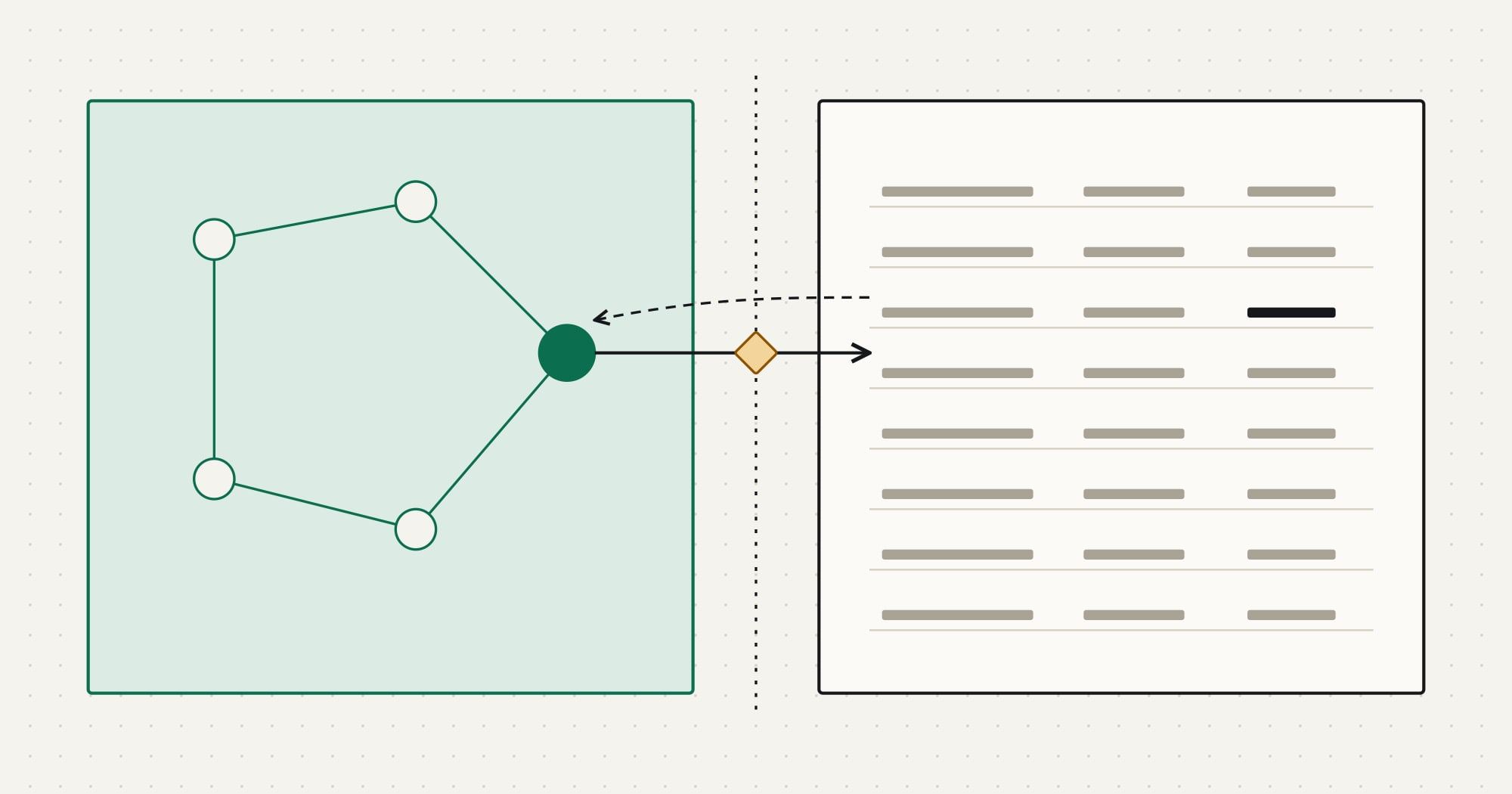
- Which system owns it? The owner is the only system allowed to create the record and edit its owned fields. Others hold a copy. Ownership can be split by field; the ERP vs CRM guide shows how.
- Which direction does it move? One-way, or two-way with field-level ownership. A two-way sync without field ownership turns every edit into a potential conflict.
- What triggers a move? An event (a webhook or change event), a schedule, or a user action. The trigger sets your latency and your failure handling.
- How are records matched? By a stored external ID, or by a natural key such as a normalized email. Never by display name.
| ERP field | CRM field | Transformation | Owner |
|---|---|---|---|
customer.number | contact.erp_customer_id | Stored as the external ID; never edited in the CRM | ERP |
customer.email | contact.email | Trimmed and lower-cased before matching | ERP |
customer.credit_hold | contact.credit_hold | Boolean; read-only in the CRM layout | ERP |
customer.sales_rep | contact.owner_id | Mapped through a rep code table; unknown codes go to review | ERP |
(none) | contact.marketing_consent | Captured in the CRM; flows back to the ERP nightly | CRM |
Write the volumes next to each object: how many records exist, how many change per day, and how many change in the worst hour (a price update, a bulk reassignment, a migration). Rate-limit design starts from the worst hour, not the average.
If the answer to “which system owns it?” is unclear for core customer data, stop here and settle it with the people who use both systems. An API cannot resolve a disagreement about ownership; it can only make it happen faster.
Authenticate as a service, not as a person
An integration that runs under an employee’s login breaks when that person leaves, changes their password or loses a permission. It also makes every automated change look like that person’s work in the audit trail. Use a dedicated integration identity:
- A service account or integration user created for this integration only, with a role that grants exactly the objects and fields in your scope.
- A server-to-server OAuth flow where the CRM supports one, typically the client credentials grant or a JWT bearer grant. Use the authorization code flow only when the integration genuinely acts on behalf of different users.
- The narrowest scopes the platform offers. Read-only scopes for objects you only read.
Tokens expire, and some are revoked early (a password reset, an admin action, a security event). Cache the access token, refresh it before it expires, and when a call returns 401, discard the cached token and retry once.
// Fictional CRM at api.example-crm.test. Credentials come from the environment, never from code.
let cached = null;

export async function accessToken() {
  if (cached && cached.expiresAt - 60_000 > Date.now()) return cached.token;
  const res = await fetch('https://auth.example-crm.test/oauth/token', {
    method: 'POST',
    headers: { 'Content-Type': 'application/x-www-form-urlencoded' },
    body: new URLSearchParams({
      grant_type: 'client_credentials',
      client_id: process.env.CRM_CLIENT_ID,
      client_secret: process.env.CRM_CLIENT_SECRET,
    }),
  });
  // Log the status, never the response body: it can contain the token.
  if (!res.ok) throw new Error(`token request failed with ${res.status}`);
  const body = await res.json();
  cached = { token: body.access_token, expiresAt: Date.now() + body.expires_in * 1000 };
  return cached.token;
}

export function forgetToken() {
  cached = null;
}
Store the client secret, private keys and refresh tokens in a secret manager, not in environment files committed to a repository. Plan rotation from the start: a secret that cannot be rotated without downtime will not be rotated. Redact Authorization headers, tokens and personal data from logs and error reports; an integration log that contains every synchronized email address is a second customer database with weaker protection.
Model the remote API behind one client
Put every call to the CRM behind a single function or class. It is the one place that adds authentication, sets timeouts, classifies errors, and decides what is safe to retry. Business code then reads like the mapping specification instead of like HTTP.
import { accessToken, forgetToken } from './crm-client.mjs';

const RETRYABLE = new Set([408, 429, 500, 502, 503, 504]);
const MAX_ATTEMPTS = 6;

export class CrmError extends Error {
  constructor(status, body) {
    super(`CRM API responded ${status}`);
    this.status = status;
    this.body = body;
  }
}

export async function crmRequest(path, { method = 'GET', body, idempotencyKey } = {}) {
  // A POST is only safe to repeat when the API deduplicates it by key.
  const retrySafe = method !== 'POST' || Boolean(idempotencyKey);
  for (let attempt = 1; ; attempt++) {
    const res = await fetch(`https://api.example-crm.test${path}`, {
      method,
      headers: {
        Authorization: `Bearer ${await accessToken()}`,
        'Content-Type': 'application/json',
        ...(idempotencyKey ? { 'Idempotency-Key': idempotencyKey } : {}),
      },
      body: body === undefined ? undefined : JSON.stringify(body),
    });
    if (res.ok) return res.status === 204 ? null : res.json();
    if (res.status === 401 && attempt === 1) {
      forgetToken(); // revoked or rotated: fetch a new token once
      continue;
    }
    if (!retrySafe || !RETRYABLE.has(res.status) || attempt === MAX_ATTEMPTS) {
      throw new CrmError(res.status, await res.text());
    }
    const retryAfter = Number(res.headers.get('Retry-After'));
    const backoff = Math.min(30_000, 500 * 2 ** (attempt - 1));
    const wait = retryAfter > 0 ? retryAfter * 1000 : backoff / 2 + Math.random() * (backoff / 2);
    await new Promise((resolve) => setTimeout(resolve, wait));
  }
}
Three decisions are encoded here. Validation errors (400, 422) and permission errors (403) are never retried: repeating them changes nothing, so they go to a review queue with the response body. Server errors and 429 Too Many Requests are retried with exponential backoff and jitter, honouring Retry-After when the API sends a number of seconds. And a POST is retried only when it carries an idempotency key, because a create that timed out may have succeeded.
Production code adds a request timeout (an AbortSignal), a cap on total retry time, and a structured log line per call with the method, path template, status, attempt and duration, without bodies.
Read incrementally with a cursor you control
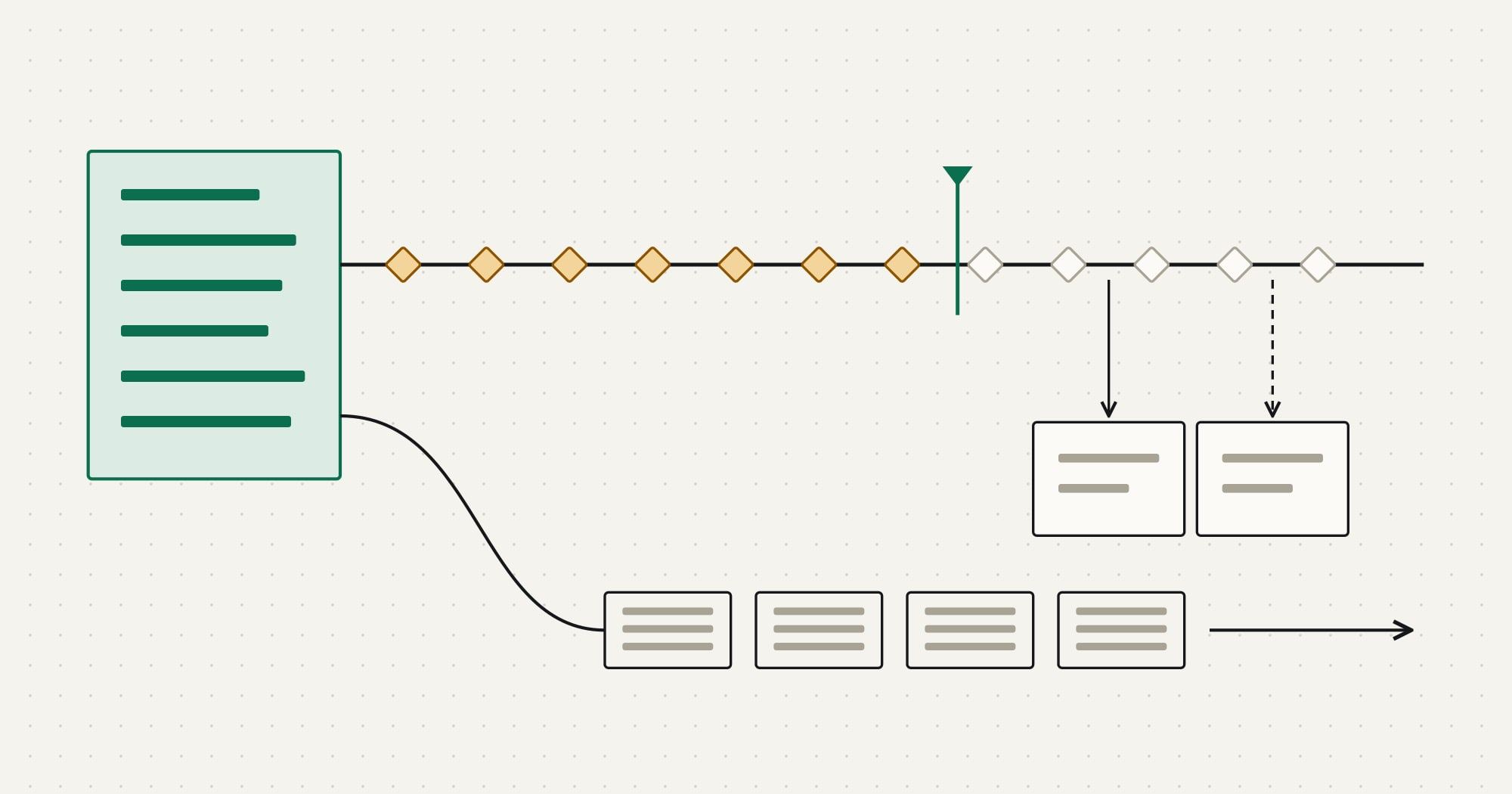
A full export on every run works for a few hundred records and fails quietly at a few hundred thousand. Incremental reads fetch only what changed since the last successful run. Most CRM APIs support one of three mechanisms:
| Mechanism | How it works | What to watch |
|---|---|---|
| Modified-since filter | Query records with updated_at after a stored timestamp, sorted by updated_at then ID |
Clock skew, late commits, records with identical timestamps |
| Change feed or event log | Read numbered change events from a stored position | Retention window: fall behind it and you need a full resync |
| Webhooks or push events | The CRM calls you when something changes | Delivery is usually at-least-once and can arrive out of order |
With a modified-since filter, the rule that prevents lost records is to persist the position only after the page is processed, and re-read a short overlap window on the next run. Records committed slightly late, or stamped by a server whose clock is a few seconds behind, then land inside the overlap instead of between two runs. The overlap means some records arrive twice, which is fine as long as the handler is idempotent.
import { crmRequest } from './crm-request.mjs';

const OVERLAP_MS = 5 * 60_000;

export async function syncChangedContacts(store, handle) {
  const saved = (await store.get('contacts.updated_after')) ?? '1970-01-01T00:00:00.000Z';
  // Re-read a short window before the saved position: late commits and clock skew
  // must not make a record fall between two runs.
  const since = new Date(Date.parse(saved) - OVERLAP_MS).toISOString();
  let page = `/v1/contacts?updated_after=${encodeURIComponent(since)}&sort=updated_at,id&limit=200`;
  while (page) {
    const { data, next } = await crmRequest(page);
    for (const contact of data) await handle(contact); // must be idempotent: the overlap repeats records
    if (data.length) await store.set('contacts.updated_after', data.at(-1).updated_at);
    page = next; // the API's own next link; never compute page N+1 yourself
  }
}
Prefer cursor-based pagination (an opaque next link or token) over offset pagination. With offsets, a record updated while you page through the results moves to a later position and another record is skipped. If the API only offers offsets, sort by a stable key and re-check the totals at the end.
- 02:00:00Connector · ReadStarts from the saved position
01:55:12, minus a five-minute overlap. - 02:00:01CRM API · ReadPage 1 returns 200 contacts sorted by
updated_at, then ID, with anextlink. - 02:00:02Connector · WriteUpserts 199 contacts; one is unchanged since the last run and is skipped by comparing a hash of mapped fields.
- 02:00:02Connector · CheckSaves the position
01:59:58only after the page is processed. - 02:00:03CRM API · FailurePage 2 returns
429withRetry-After: 2. - 02:00:05Connector · ReadRetries page 2 after two seconds; 37 contacts, no
nextlink. The run ends.
Schedule a periodic full reconciliation as well, weekly or monthly depending on volume: compare record counts and a checksum of key fields between the two systems, and resync what differs. Incremental sync is efficient; reconciliation is what proves it has not drifted.
Make every write safe to retry
Networks fail after the request is sent and before the response arrives. The connector cannot know whether the CRM created the record, so it must be safe to send the same write again. There are two standard ways to achieve that:
- Upsert by external ID. Store the source system’s identifier in a unique field on the CRM record and write with “create or update by this key”. Repeating the call updates the same record.
- Idempotency keys. Where the API supports them, send a key derived from the source event (for example the source record ID plus its version). The API returns the original result for a repeated key instead of performing the action twice.
import { crmRequest } from './crm-request.mjs';

export function upsertContact(customer) {
  const key = encodeURIComponent(customer.customerNo);
  return crmRequest(`/v1/contacts/by-external-id/erp_customer_id/${key}`, {
    method: 'PUT',
    body: {
      erp_customer_id: customer.customerNo,
      email: customer.email.trim().toLowerCase(),
      first_name: customer.firstName,
      last_name: customer.lastName,
    },
  });
}Request
PUT /v1/contacts/by-external-id/erp_customer_id/C-1042 HTTP/1.1
Host: api.example-crm.test
Authorization: Bearer <redacted>
Content-Type: application/json

{"erp_customer_id":"C-1042","email":"[email protected]","first_name":"Ana","last_name":"Ortiz"}
Response 200 OK
{
"id": "ct_8f2a91",
"erp_customer_id": "C-1042",
"email": "[email protected]",
"created": false,
"updated_at": "2026-10-28T02:00:02Z"
}
Sending the same request again returns the same record with created: false. Without the external ID, a retried create would produce a second Ana Ortiz.
Records that fail validation go to a dead-letter queue (a table or queue of failed messages) with the payload, the error, the attempt count and a link to the source record. Someone fixes the data at the source and replays the message. A failure that only exists in a log file is a failure nobody will fix.
For multi-step writes, such as creating an account, then its contacts, then a deal, design each step to be repeatable and record progress, so a retry resumes rather than starting over. Where the CRM offers a composite or batch endpoint that applies several operations together, check in its documentation whether the batch is all-or-nothing or can partially succeed, and handle per-record results either way.
Receive webhooks without trusting them
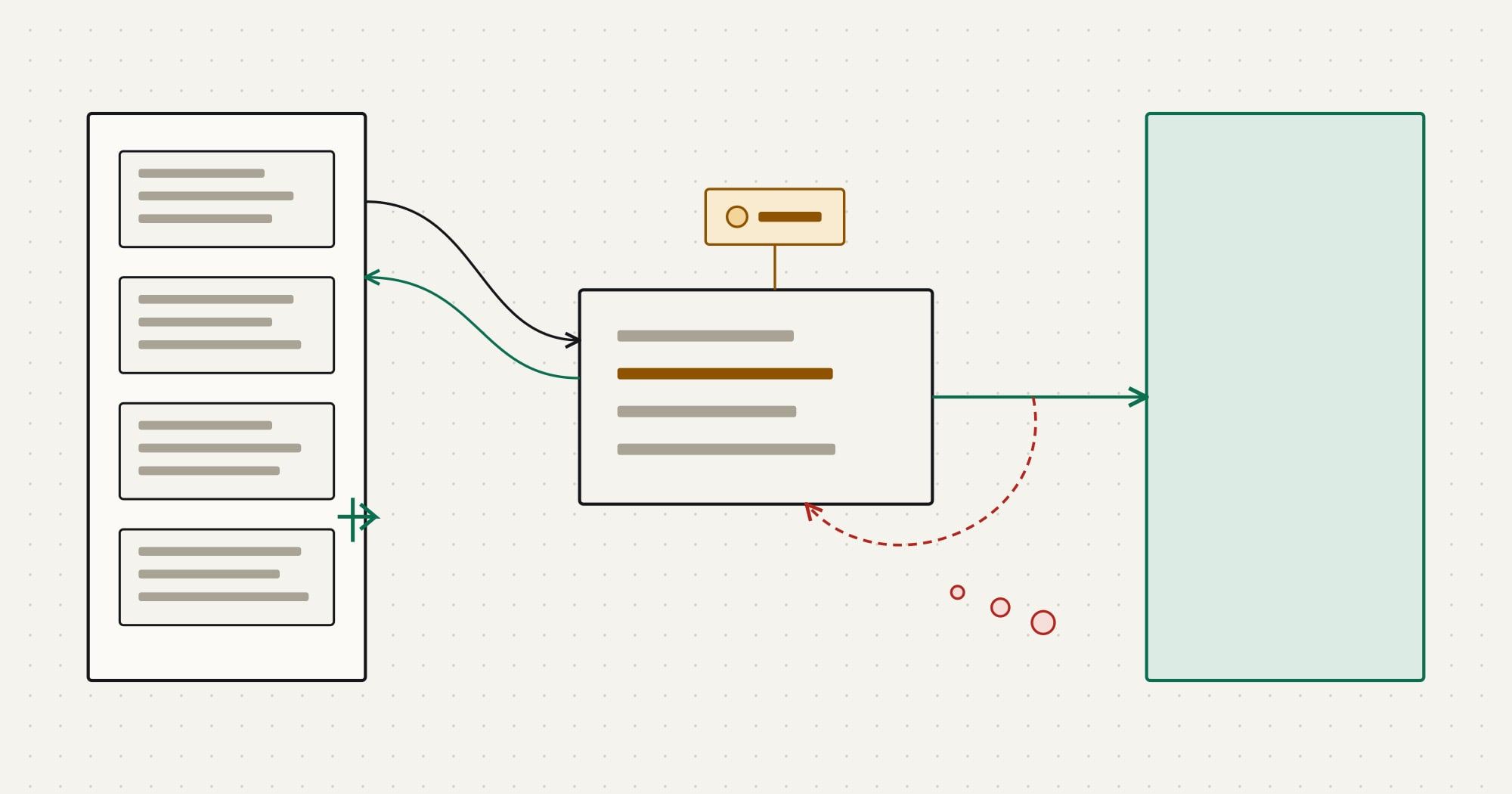
Webhooks cut latency from minutes to seconds and save API calls, but treat each delivery as a hint that something changed, not as an authoritative copy of the record. Deliveries can be duplicated, delayed, reordered, or missing. A robust receiver does four things, in this order:
- Verify the signature over the raw request body before parsing it, using the scheme the CRM documents (commonly an HMAC with a shared secret, plus a timestamp to reject replays).
- Deduplicate by the event ID the CRM sends, keeping processed IDs for longer than the CRM’s retry window.
- Enqueue and acknowledge quickly. Return a
2xxwithin the time the sender allows; do the work from the queue. Slow endpoints cause the sender to retry, which multiplies load. - Fetch the current record when order matters, instead of applying the payload blindly. The latest state from the API cannot be out of order.
import { createHmac, timingSafeEqual } from 'node:crypto';

const TOLERANCE_MS = 5 * 60_000;

export function verifyWebhook(rawBody, headers, secret, now = Date.now()) {
  const timestamp = headers['x-crm-timestamp'];
  const signature = headers['x-crm-signature'] ?? '';
  if (!timestamp || Math.abs(now - Number(timestamp) * 1000) > TOLERANCE_MS) return false;
  const expected = createHmac('sha256', secret).update(`${timestamp}.${rawBody}`).digest();
  const received = Buffer.from(signature, 'hex');
  return received.length === expected.length && timingSafeEqual(received, expected);
}
The header names and the signed string here belong to the fictional CRM; real platforms each define their own, and some sign with a public key instead of a shared secret. The constant-time comparison and the timestamp tolerance apply to all of them.
- 01CRM to Receiver
contact.updatedevt_71 - 02ReceiverVerify signature, check event ID
- 03Receiver to QueueEnqueue evt_71
- 04Receiver to CRM
204within the timeout - 05CRM to ReceiverSame evt_71 again (sender retry)
- 06Receiver to CRM
204, already seen: dropped - 07Queue to WorkerDeliver evt_71
- 08Worker to CRM APIGET current contact
- 09CRM API to WorkerLatest version
Keep a scheduled incremental read running even when webhooks are enabled. It catches deliveries that never arrived, and it is your recovery path after the receiver has been down.
Respect rate limits by design
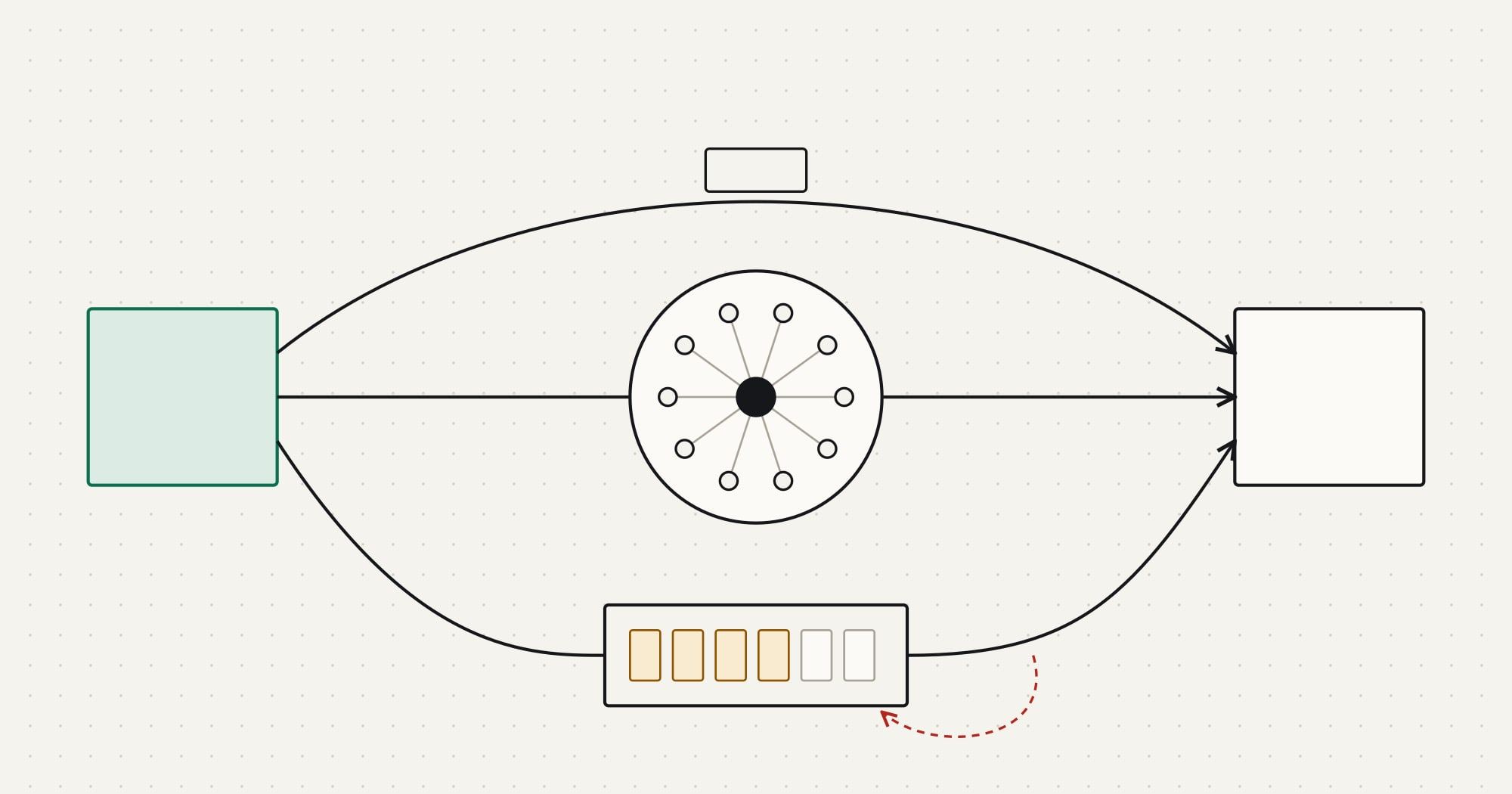
Every CRM limits API usage, typically with some combination of per-second or per-minute request limits, daily allocations shared across all integrations in an account, and limits on concurrent requests. The numbers differ by platform, edition and sometimes by the number of licensed users, and they change, so read them from the platform’s current documentation and, where it exposes one, from its usage or limits endpoint at run time.
- Budget per integration. If the daily allocation is shared, agree how much each integration may use and alert at a threshold, before another team’s connector starts failing.
- Use bulk and batch endpoints for large changes. Updating fifty thousand records one call at a time is the usual way integrations exhaust a daily allocation.
- Throttle in the connector. A token bucket or a queue with a fixed concurrency keeps you under per-second limits instead of discovering them through
429responses. - Back off on
429and honourRetry-After. Retrying immediately makes the limit last longer. - Coalesce changes. Ten updates to the same record within a minute need one write with the final state.
Test against contracts and a sandbox
Unit tests with a mocked HTTP layer cover mapping and error classification, which is where most logic lives. They do not prove the API behaves the way you assumed. Add three more layers:
- Contract tests that call the CRM’s sandbox for each endpoint you use and assert the fields, types and error shapes your code depends on. Run them on a schedule as well as in CI, so a vendor-side change shows up before it breaks production.
- Fixture data that is clearly fictional: example domains such as
example.com, invented names, no copies of production records. Production data in test environments is a privacy incident waiting to happen. - Failure injection: expired tokens,
429storms, timeouts after the write succeeded, duplicate and out-of-order webhooks, a required field added to the CRM, a picklist value renamed. Each should end in a retry, a review-queue item or an alert, never in silent data loss.
Before the integration goes live
Data
- Every mapped field has one owner and one direction
- Records are matched by stored external IDs, with a documented fallback key
- A backfill of existing records has run and been reconciled
Reliability
- Writes are upserts or carry idempotency keys
- Retries use backoff, honour
Retry-Afterand stop at a limit - Failed records land in a dead-letter queue that someone owns
Security
- The integration uses its own identity with minimal scopes
- Secrets live in a secret manager and can be rotated
- Logs contain no tokens or full personal records
Operations
- Dashboards show throughput, error rate, queue age and API usage
- Alerts fire on sustained failures and on a stalled cursor
- A runbook explains how to replay, resync and pause the integration
Operate it: logs, metrics, replay and reconciliation
An integration is a small production system, and it needs the same operational basics as any other. The checks below are the ones that catch real problems early:
- Freshness: the age of the newest processed change per object. A cursor that stops moving is the clearest signal that something is wrong, even when no errors are logged.
- Failure rate and dead-letter age: a few failures a day may be normal data problems; a review queue that nobody empties is not.
- API usage against the allocation, per integration.
- Reconciliation results: counts and checksums per object, with differences listed.
Give operators three controls: pause (stop writing, keep reading), replay (re-run selected failed messages after a fix), and resync (re-read an object from a chosen date). With those, most incidents become a short procedure instead of a data repair project.
When an integration needs more than one connector, such as a CRM, an ERP, a billing system and a support desk, the decisions above repeat for every pair, and it is worth deciding whether to run them on an integration platform or in your own service. The integration platforms vs custom integration framework covers that choice. For delivery help, Comtau’s API integration services cover custom connectors end to end, and CRM integration services cover the wider design of ownership, sync modes and conflict rules.