Architecture deep diveCRM APIs & sync
Salesforce Integration Patterns: APIs, Events and Architecture Decisions
Salesforce offers more ways to integrate than most CRMs: several APIs, two families of events, outbound calls and external objects. Choosing between them is an architecture decision about direction, timing, volume and failure handling.
- By
- Comtau Editorial
- Published
- Reading
- 8 min · 7 sections
In short
- Start from the pattern (who initiates, whether the caller waits, how much data moves) and only then choose the API.
- Inbound data at volume belongs on Bulk API 2.0; record-level reads and writes on the REST API, with upserts by external ID.
- Outbound change notification is best served by Change Data Capture or platform events, consumed through the Pub/Sub API with a stored replay ID.
- Authenticate with a dedicated integration user and a server-to-server OAuth flow, and watch the org’s shared API allocation.
Salesforce is the CRM most often named in integration requirements, and also the one with the widest range of integration mechanisms. This deep dive maps those mechanisms onto the integration patterns Salesforce itself documents, explains what each one implies for reliability, and ends with the decisions an architect has to write down before building. It describes platform capabilities as documented by Salesforce at the time of writing; limits and feature availability depend on edition and release, so confirm them against the current documentation for your org. The vendor-neutral mechanics, such as idempotent writes, cursors and webhook handling, are covered in how to build a CRM API integration.
The pattern catalogue comes first
Salesforce publishes an architecture guide, Integration Patterns and Practices, that classifies integrations by what they do rather than by technology. Its patterns are a useful shared vocabulary, because each one rules certain mechanisms in or out:
| Criterion | What happens | Typical mechanisms |
|---|---|---|
| Remote process invocation: request and reply | Salesforce calls an external system and waits for the answer before continuing (for example, a credit check during quoting) | Apex callouts with Named Credentials, External Services, flows that call out |
| Remote process invocation: fire and forget | Salesforce starts work elsewhere and does not wait; the remote system acknowledges receipt | Platform events, Change Data Capture, outbound messages, asynchronous Apex |
| Batch data synchronization | Large sets of records are created or refreshed in either direction on a schedule | Bulk API 2.0, ETL or iPaaS jobs, Change Data Capture for incremental changes |
| Remote call-in | An external system creates, reads, updates or deletes Salesforce records | REST API, SOAP API, Composite resources, Bulk API 2.0 for volume |
| UI update based on data changes | The Salesforce user interface reflects changes made elsewhere without a reload | Platform events or Change Data Capture consumed in the UI |
| Data virtualization | Salesforce displays external data without copying it | Salesforce Connect with external objects (for example over OData) |
Naming the pattern for each data flow before choosing an API avoids the most common design mistake: implementing everything as synchronous remote call-in, with an external system polling Salesforce every few minutes for changes it could have been told about.
Calling into Salesforce: REST, Bulk and composite requests
For an external system that reads and writes Salesforce records, the choice is mostly about volume and atomicity.
Record-level work on the REST API
The REST API covers individual records (the sObject resources), SOQL queries, and composite resources that bundle several operations in one request. Two features matter most for integrations:
- Upsert by external ID. Mark a custom field as an External ID, store the source system’s key in it, and write with a
PATCHto the sObject resource addressed by that field and value. Salesforce updates the matching record or creates one, so a retried write cannot create a duplicate. - Collections and composite requests. sObject Collections process up to 200 records in one call, and composite resources chain dependent operations. Check per request whether you want all-or-nothing behaviour or partial success, and handle per-record errors either way.
Request
PATCH /services/data/vXX.X/sobjects/Account/ERP_Customer_Number__c/C-1042 HTTP/1.1
Host: yourdomain.my.salesforce.com
Authorization: Bearer <redacted>
Content-Type: application/json

{"Name":"Northwind Fixtures (example)","BillingCity":"Springfield"}
Response 201 Created
{
"id": "001XXXXXXXXXXXXXXX",
"success": true,
"errors": [],
"created": true
}
vXX.X stands for the API version your integration pins; the custom field name and values are fictional. A repeat of the same request updates the same account instead of creating a second one.
Volume on Bulk API 2.0
Bulk API 2.0 processes large data sets asynchronously: you create a job (insert, update, upsert, delete, or a query), upload CSV data, and poll the job until it completes, then download the successful and failed records. It is the right tool for initial loads, nightly synchronizations and mass updates, because it is designed for volumes that would otherwise consume a large share of the org’s API allocation. Failed rows come back with error messages, which makes them straightforward to route to a review queue.
Limits are an org-wide budget
Salesforce counts API requests against an allocation for the whole org over a rolling 24-hour period, and the allocation depends on the edition and licences. Every integration and tool connected to the org draws from the same budget. The REST API’s limits resource reports current usage, so an integration can check its headroom and alert before it runs out. Design for the shared budget: bulk jobs for large changes, composite and collection requests instead of single-record loops, and events instead of polling.
Getting changes out of Salesforce: events
Polling Salesforce for changes is expensive and slow. The platform can instead publish changes as events.
Change Data Capture
Change Data Capture publishes a change event when a record of an enabled object is created, updated, deleted or undeleted. Each event carries a header describing the change (including the change type, the affected record IDs and the changed fields) along with the changed values. It is the closest thing Salesforce offers to a change log for synchronization, and it needs no code in the org beyond selecting the objects.
Two details matter in practice. Updates carry the fields that changed, not necessarily the full record, so a subscriber that needs the whole record reads it through the API. And Salesforce can emit special gap events when it cannot provide a regular change event, for example after certain bulk operations; a subscriber must treat a gap event as an instruction to re-read the affected records.
Platform events
Platform events are custom, schema-defined messages that you publish deliberately, from flows, Apex or external systems. Use them when the business event is not a record change, such as “order submitted for fulfilment”, or when you want a stable contract that does not expose the internal object model.
Subscribing with the Pub/Sub API, and the replay ID
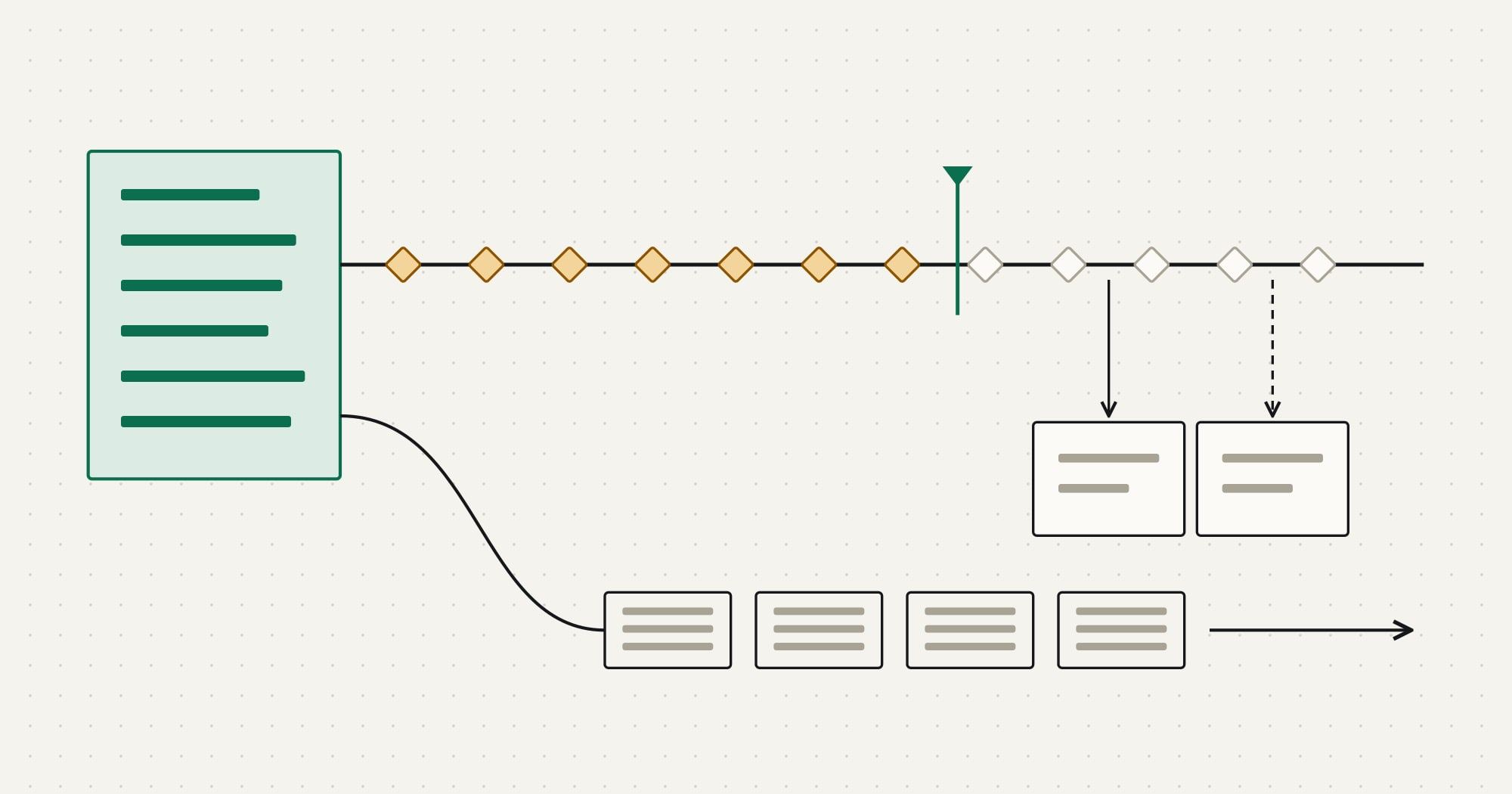
The Pub/Sub API is a gRPC-based interface for publishing and subscribing to platform events and change events. Salesforce documents that it retains these events for 72 hours. Every event has a replay ID that marks its position in the stream; it is opaque, not guaranteed to be contiguous, and must not be computed. A subscriber stores the replay ID of the last event it processed and resubscribes from it after a disconnect (event message durability).
- 01Salesforce to Event busAccount updated: change event
- 02Event bus to SubscriberEvent with replay ID
- 03Subscriber to TargetIdempotent upsert
- 04SubscriberStore replay ID after the write
- 05Subscriber to Event busDisconnected (deploy, outage)
- 06Subscriber to Event busResubscribe from stored replay ID
- 07Event bus to SubscriberMissed events within retention
The consequences for architecture are direct. Store the replay ID only after the event is processed. Make processing idempotent, because events can be delivered again after a reconnect. Monitor how far behind the subscriber is, and keep a documented resync procedure (typically a Bulk API query of records modified since a point in time) for outages longer than the retention window.
Calling out from Salesforce
Some flows start inside Salesforce and must reach an external system: a quote needs a price from the ERP, or a closed opportunity must create an order. The request-and-reply pattern uses Apex callouts or External Services, with Named Credentials holding the endpoint and authentication so that secrets are not stored in code. Synchronous callouts are not allowed directly from triggers, so anything triggered by a record change runs asynchronously (queueable Apex, or an event that an external subscriber handles).
Prefer fire-and-forget for anything that does not need an immediate answer. Publishing a platform event and letting an external worker create the ERP order keeps the user’s transaction fast and moves retries outside the platform, where they are easier to observe.
Authentication and the integration user
Integrations should not run as a named employee. Create a dedicated integration user with a permission set limited to the objects and fields in scope; Salesforce provides an API-only integration user licence and profile for this purpose. For server-to-server access, use an OAuth 2.0 flow that does not involve a person: the JWT bearer flow, which signs a token request with a certificate whose public part is registered in Salesforce, or the client credentials flow.
Salesforce has been moving new integrations from connected apps to External Client Apps, which support these server-to-server flows. Check your org’s current release notes for which app type can be created, and avoid the username-and-password flow in new work.
Choosing tools: native, platform or custom
Many common connections (to marketing automation, support desks, telephony, collaboration tools) are available as managed packages or native connectors from the other vendor or from Salesforce. Integration platforms offer prebuilt Salesforce connectors with mapping, scheduling and retries. Custom services give full control over idempotency, ordering and error handling. The trade-offs are the same as for any CRM and are set out in the integration platforms vs custom integration decision framework; for Salesforce specifically, weigh how each option consumes the shared API allocation and whether it supports Change Data Capture or only polling.
An architecture worksheet
Before building a Salesforce integration, write down one line per data flow:
Salesforce integration design decisions
Per data flow
- Pattern: request and reply, fire and forget, batch sync, remote call-in, UI update, or virtualization
- Direction and system of record for each field (see the ERP vs CRM ownership split for the most common case)
- Trigger and acceptable delay
- Volume per day and in the worst hour
- Matching key: an External ID field, never a name
Per integration
- Integration user, permission set and OAuth flow
- API allocation budget and how usage is monitored
- Replay ID storage and the resync procedure beyond event retention
- Review queue for rejected records, and who owns it
- Sandbox and contract tests, refreshed after each Salesforce release
A Salesforce integration designed this way usually ends up with Bulk API 2.0 jobs for initial and periodic loads, REST upserts by external ID for record-level writes, Change Data Capture or platform events for outbound changes, and a small number of callouts where a user is genuinely waiting for an answer. Comtau’s CRM integration services cover this design work, and API integration services cover the connectors themselves.