ExplainerCRM data & migration
What Is a CRM Database? Objects, Relationships and Identifiers Explained
Behind every CRM screen is a database of records and relationships. Knowing how that model is built (which objects exist, how they link, which identifiers are stable) is what separates an integration or migration that stays correct from one that slowly fills the CRM with duplicates.
- By
- Comtau Editorial
- Published
- Reading
- 6 min · 8 sections
In short
- Every CRM has a database underneath, usually a relational one, organized into objects (accounts, contacts, deals, activities) with fields and relationships.
- Integrations and migrations depend on identifiers: the CRM’s own record IDs, external IDs from other systems, and normalized natural keys such as email.
- History, merges, deletions and permissions are part of the database too, and each affects what an integration may read or write.
Is there a database inside every CRM?
Yes. Whether a CRM is a hosted SaaS product or custom software, its records are stored in a database, typically a relational one, and the screens, reports and automations are views and processes over that data. In SaaS CRMs you do not access the database directly; you work with it through the user interface, imports and exports, and the API, which exposes the same objects and fields.
When people ask for a “CRM database”, they usually mean one of three things: the CRM’s data model (what this article explains), a list of customer and prospect records (the contents), or a lightweight database used as a CRM. Understanding the data model helps with all three.
The core objects
CRM vendors name things differently (an opportunity in one product is a deal in another, an account may be a company or an organization), but the core objects are remarkably consistent:
| Object | What one record represents | Typical key fields |
|---|---|---|
| Account (company, organization) | A business you sell to or serve | Name, domain, industry, owner, billing and shipping address |
| Contact (person) | A person, usually linked to an account | Name, email, phone, role, consent and communication preferences |
| Lead | An unqualified prospect, kept separate until qualified | Source, status, company name as text |
| Opportunity (deal) | A potential sale moving through stages | Amount, currency, stage, close date, owner, probability |
| Line item | A product or service on an opportunity or quote | Product, quantity, unit price, discount |
| Activity | A call, email, meeting or task | Type, date, related records, outcome |
| Case (ticket) | A service request after the sale | Status, priority, channel, related contact and account |
Most CRMs add custom objects for business-specific records (a property listing, a subscription, a site visit), and custom fields on standard objects. Custom objects are where a CRM starts to reflect how a particular business works, and where Comtau’s custom CRM development work usually begins when a packaged CRM cannot represent the process.
Relationships between records
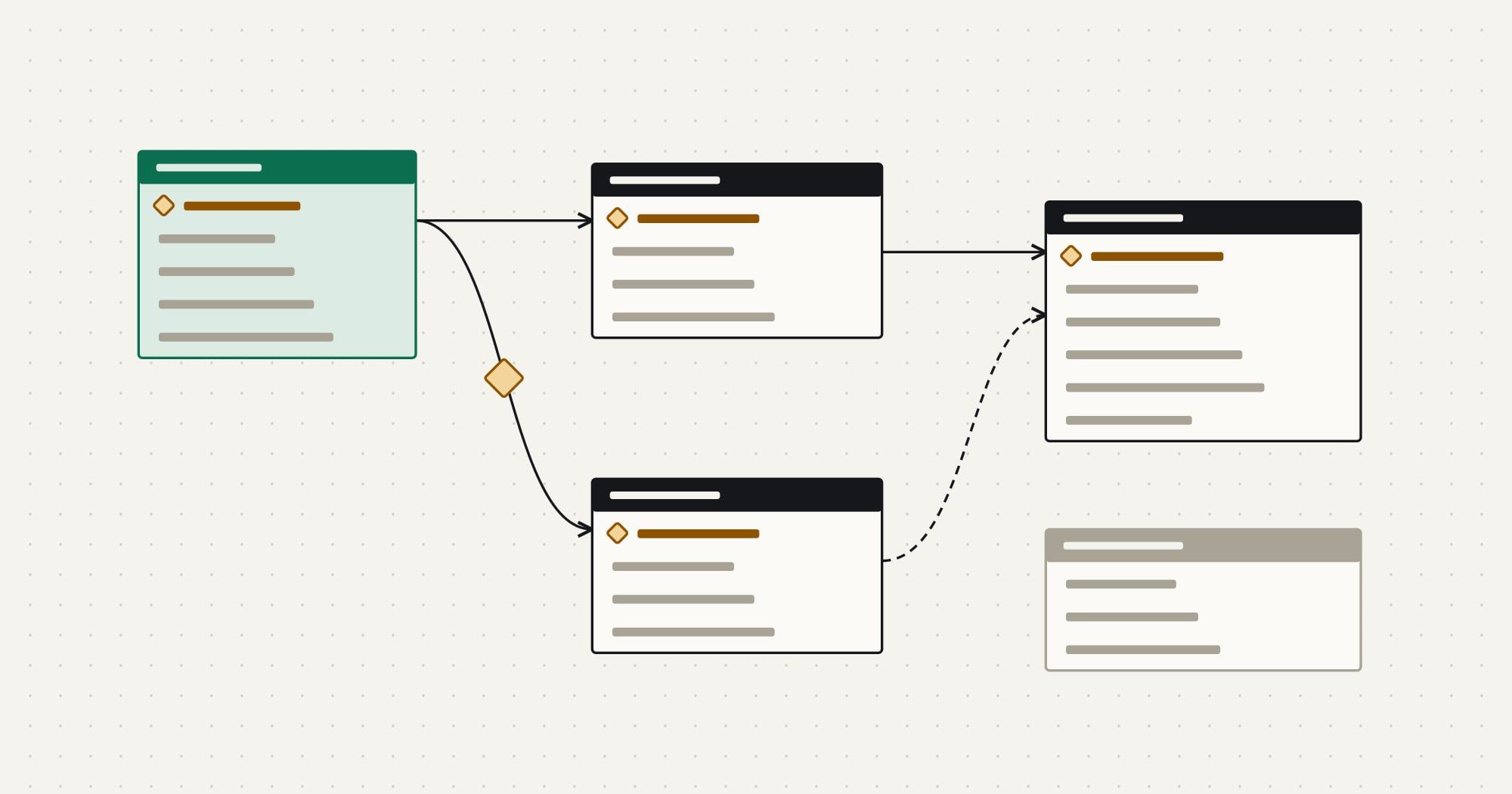
Records are useful because of how they link. Three relationship shapes cover almost every CRM:
- One-to-many. One account has many contacts, opportunities and cases. The child record holds a reference (a lookup) to the parent’s ID.
- Many-to-many. A contact can play a role on several opportunities, and an opportunity involves several contacts. CRMs model this with a junction record (often called a contact role or association) that references both sides and may carry its own fields, such as “decision maker”.
- Hierarchies. Accounts can have parent accounts (a subsidiary and its group), which matters for reporting and for matching records from systems that only know the parent.
Account
One per organization
System of record for
- account.id
- name
- domain
- parent_account_id
Contact
Many per account
System of record for
- contact.id
- phone
Reads a copy of
- account_id
Opportunity
Many per account
System of record for
- opportunity.id
- amount
- stage
Reads a copy of
- account_id
- contact roles
- Owned record
- Read-only copy
Relationships are why load order matters in a migration: accounts must exist before the contacts that refer to them, and opportunities before the line items on them. The CRM data migration guide turns that into a step-by-step plan.
Identifiers: the part integrations depend on
Every record has an identifier, and an integration is only as reliable as the identifiers it matches on. A CRM database typically holds three kinds:
- Internal record IDs, generated by the CRM. They are stable for the record’s life, unique, and the only identifier the CRM’s API guarantees. They change when data is migrated to another CRM, and the merged-away record’s ID disappears when two duplicates are merged.
- External IDs, the identifiers of the same entity in other systems, such as an ERP customer number or a billing account ID, stored in dedicated fields. Many CRMs let you mark such a field as unique and use it to upsert: “update the record with this external ID, or create it”. External IDs are what make integrations idempotent.
- Natural keys, attributes that identify the real-world entity: a person’s email address, a company’s web domain or tax number. They are useful for matching records that have no shared ID yet, but they are not unique by nature. People change email addresses, share mailboxes and use personal addresses, and companies have several domains.
| Field | Kind | Transformation | Owner |
|---|---|---|---|
contact.id | internal ID | Reference it from other CRM records and in API calls; never reuse after a merge | CRM |
contact.erp_customer_id | external ID | Unique; the key for upserts from the ERP | ERP |
contact.billing_contact_ref | external ID | Unique per billing system account | Billing |
contact.email_normalized | natural key | Trimmed, lower-cased; a match candidate, not proof | CRM |
The practical rules follow. Match on external IDs whenever both systems have one. When they do not, match on normalized natural keys, record the match, and write the external ID back so the next sync matches by ID. Never match on display names alone, and never treat a natural-key match as certain without a rule for what happens when two records match.
Fields, picklists and data types
Fields have types (text, number, currency, date, boolean, picklist, lookup), and the types constrain what an integration may write. Picklists (enumerated values such as lead source or deal stage) cause more integration failures than any other type, because the same concept has different values in each system and administrators rename values without knowing an integration depends on them. Map picklists value by value, and treat an unknown value as a review item rather than a default.
Currency fields need a currency code alongside the amount, and dates need a time zone convention. Required fields and validation rules apply to API writes as well as to users, so a rule added by an administrator can start rejecting an integration’s writes the next day.
History, merges and deletion
A CRM database keeps more than current values:
- Field history and audit logs record who changed what and when, if enabled per object and field. Integrations should write as their own user so their changes are distinguishable from people’s.
- Merges combine duplicates into one surviving record and re-link the losers’ related records. Integrations that stored the loser’s ID must be able to find the survivor; many CRMs report merges through their APIs or change events.
- Deletion is often a soft delete into a recycle bin before permanent removal. Privacy requests can require erasing a person’s data across every connected system, which is far easier when each system knows the others’ IDs for that person.
Ownership and permissions
“Owner” has two meanings in a CRM database, and they are often confused. The record owner is the user or team responsible for the record inside the CRM, and it drives visibility and assignment. The system of record is the system authoritative for the data. An account can be owned by a sales rep in the CRM while its billing address is owned by the ERP; how to split that is the subject of ERP vs CRM: what each system owns.
Permissions apply to integrations too. An integration user that can see every object and field is convenient and risky; one limited to the objects in its scope fails loudly when the scope grows, which is the better failure.
How integrations read and write the database
An integration never touches a SaaS CRM’s database directly. It goes through the API, which enforces permissions, validation and limits. That means everything above becomes an API concern: reading changed records incrementally, writing with upserts by external ID, handling merges and deletions, and mapping picklists. The CRM API integration guide walks through each, and Comtau’s CRM integration services start every project from the data model before any connector is built.